
If you want to know how to reduce bounce rate, start by understanding the decisions visitors make in their first few seconds on your site. People do not leave websites randomly. They leave for measurable, predictable reasons: pages that load slowly, layouts that break on phones, navigation that creates questions instead of answering them, and contact details that hide when buyers need them most. We pulled the research together and charted it so you can see exactly where visitors fall off and what fixing each leak is worth.
Key takeaways:
- The decision happens fast. A visual first impression forms in roughly 0.05 seconds, 42% of consumers decide whether to stay or leave within 10 seconds, and 55% of visits are over in under 15 seconds.
- Speed is the largest single lever. Google’s modeling shows bounce probability rises 32% when load time goes from 1 to 3 seconds, and 123% at 10 seconds.
- Clutter has a price tag. The median mobile page has tripled in weight since 2015, and Google found conversion probability drops 95% as on-page elements climb from 400 to 6,000.
- Navigation is a conversation. 61.5% of users cite confusing navigation as a reason they leave, and half of referred visitors head straight to your menu to orient themselves.
- The stranger test is real. 64% of buyers expect contact information on your homepage, and 44% will leave if they cannot find it.
- Bounce rate only matters in context. The cross-industry median sits in the mid-40s, but a healthy number for a blog post would be a crisis on a checkout page.
What Do Visitors Decide in the First 10 Seconds?
Every visit begins with a blink test. Research from the Nielsen Norman Group shows that a visitor forms a visual judgment of your page in about one twentieth of a second, long before they read anything. From there, a quiet countdown runs: survey data shows 20% of consumers decide whether to stay or leave within 5 seconds, 42% have decided by 10 seconds, and panel data covering two billion page views found that 55% of visitors are actively gone before the 15-second mark.
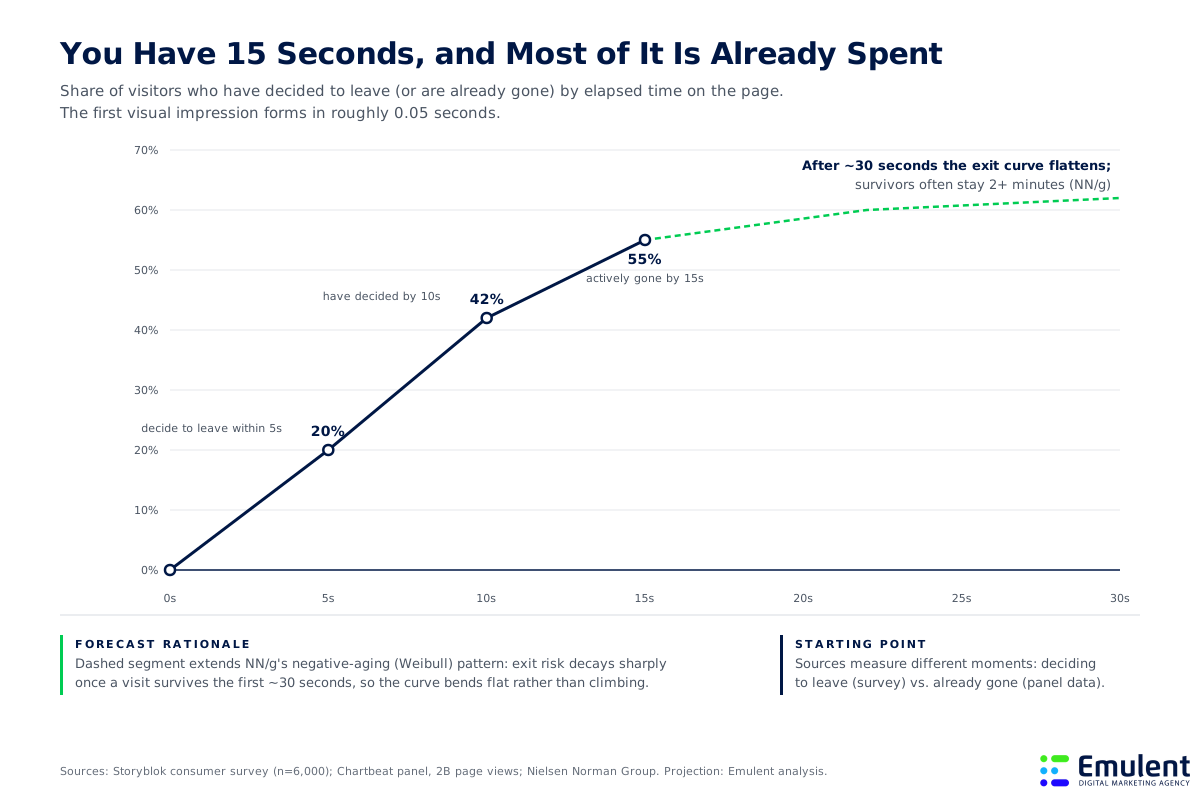
The encouraging part of the research is what happens after the danger zone. Once a visit survives roughly 30 seconds, the exit curve flattens, and visitors who make it that far often stay two minutes or more. The practical takeaway: your value proposition has to land within 10 seconds, because that is the window in which most of your traffic is deciding whether you are worth a second look.
What your page must communicate inside the 10-second window:
- What you do. A headline that states your offer plainly beats a clever one that makes visitors guess. Vague feels risky to a stranger.
- Who it is for. Visitors are matching themselves against your page. Name the audience or the problem so they recognize themselves immediately.
- What to do next. One visible, specific call to action. If the next step is unclear at a glance, the back button becomes the next step.
Most websites fail the first 10 seconds not because they say the wrong thing, but because they try to say everything. Clarity is a subtraction exercise. – Emulent Strategy Team
And before a visitor can judge your headline at all, your page has to show up. That makes speed the gatekeeper of everything else.
How Much Damage Does Page Speed Do Before Anyone Reads a Word?
Speed losses happen earlier than any messaging or design decision can help. Google trained a neural network on more than 900,000 mobile landing pages to model the relationship between load time and abandonment, and the curve it found compounds quickly. Moving from a 1-second load to a 3-second load raises bounce probability by 32%. At 5 seconds it is up 90%, and at 10 seconds it is up 123%. Separately, Google found that 53% of mobile visitors abandon a page outright when it takes longer than 3 seconds.
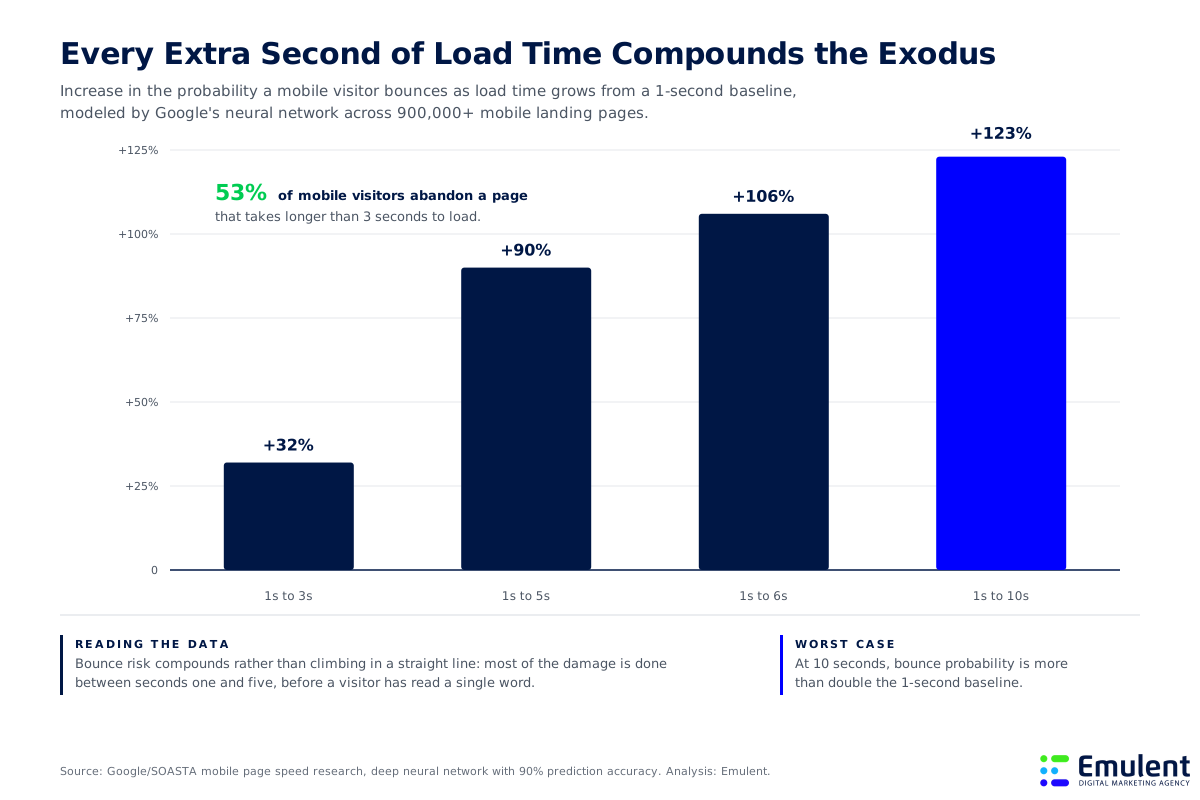
Notice where the damage concentrates: between seconds one and five. That is why speed work delivers some of the fastest, most measurable bounce-rate improvements available. You are not persuading anyone; you are simply removing a wall that stood between visitors and your content. Skip this work and every dollar you spend on ads, SEO, and content pays a toll before it can perform.
Speed fixes that move the needle most for WordPress sites we work on:
- Compress and resize images. Images are the heaviest resource type on most pages. Serving modern formats at the displayed size routinely cuts total weight by a third or more.
- Prune third-party scripts. Every tracking pixel, chat widget, and embed adds requests. Audit quarterly and remove anything that no longer earns its load cost.
- Upgrade your hosting. Server response time caps everything downstream. For WordPress builds we recommend managed platforms like WP Engine or Kinsta, because shared hosting bottlenecks undo front-end optimization.
- Cache aggressively. Page caching and a CDN mean returning visitors and distant visitors get near-instant loads without ongoing effort.
Speed problems rarely appear on their own, though. They are usually a symptom of a heavier disease: accumulation.
What Is the Clutter Tax, and How Much Is Your Site Paying?
Websites gain weight the way junk drawers fill up: one harmless addition at a time. HTTP Archive data covering millions of sites shows the median mobile home page grew from about 0.8 MB in 2015 to 2.6 MB in 2025, roughly 8% compound growth every year for a decade, despite faster networks and better tooling. Based on that pattern and the continued pile-up of consent banners, analytics tags, and AI chat widgets, we project the median page passes 3 MB by 2028.
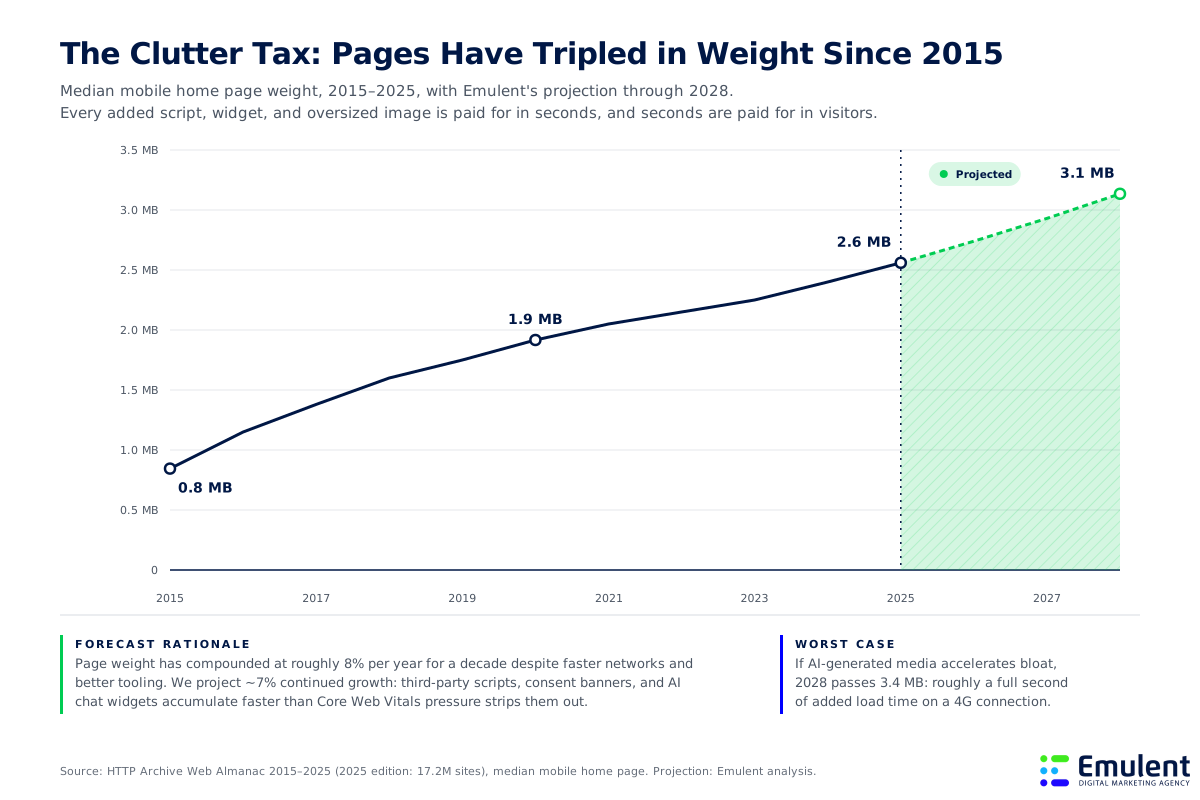
Weight is only half the tax. The other half is cognitive. In the same landing-page research, Google found that as the number of on-page elements climbs from 400 to 6,000, the probability of conversion drops 95%. Every extra banner, badge, slider, and competing call to action splits attention, and split attention converts poorly. If you track your numbers against average conversion rate benchmarks by industry, a cluttered page is usually the quiet reason a site sits below its peers; you can see those benchmarks in our conversion rate by industry report.
Every element on a page is a tax on the action you actually want. The question is never whether something looks nice. It is whether it earns more attention than it spends. – Emulent Strategy TeamHow to run a clutter audit on any key page:
- Count the calls to action. If a page asks visitors to do more than one primary thing, it is competing with itself. Pick the action that matters and demote the rest.
- Justify every script. List each third-party tool loading on the page and the decision it informs. No decision, no script.
- Cut decorative motion. Carousels, auto-playing video, and animation draw the eye away from the message and add weight at the same time.
- Re-test after removal. Measure engagement before and after. In our experience, subtraction outperforms addition far more often than teams expect.
A lighter page loads faster and reads cleaner, but visitors still need a path through it. That path is your navigation, and visitors treat it like a dialogue.
Is Your Navigation Answering Questions or Creating New Ones?
Think of every click as a question the visitor is asking: where are your services, what does this cost, can I trust you. Website navigation best practices exist to make sure every one of those questions gets an immediate, obvious answer. When the answer is unclear, visitors do not puzzle through it; they leave. In a multi-select survey of users, 88.5% cited slow-loading pages as a reason they abandon a site, 73.1% cited sites that are not mobile-responsive, and 61.5% cited confusing navigation. Aesthetic complaints like outdated design (38.5%) trail well behind the functional failures.
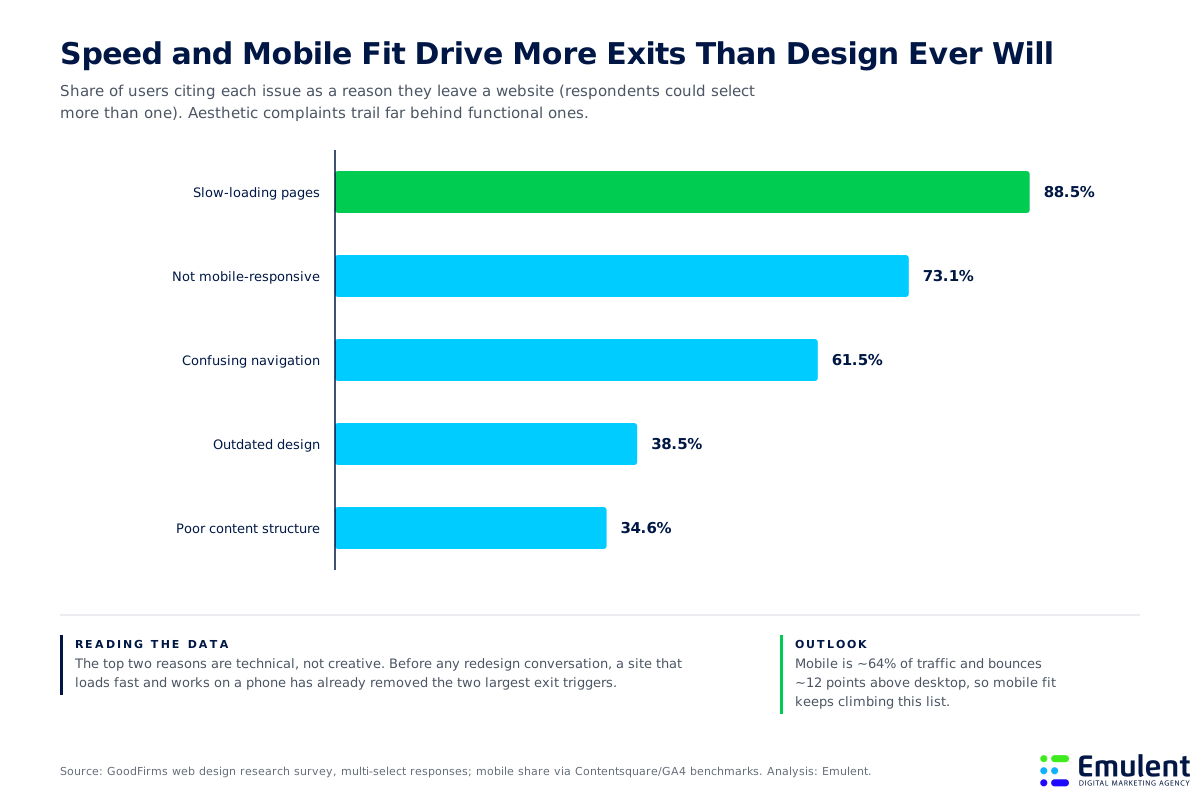
The ordering matters. Teams often reach for a visual refresh when the data says the real exits come from speed, mobile fit, and findability. With mobile now carrying roughly 64% of traffic and bouncing about 12 points higher than desktop, a menu that works beautifully on a designer’s monitor and clumsily on a phone is failing most of your audience. This is the core of how we approach website design services: structure first, decoration second.
Navigation principles that answer questions instead of raising them:
- Label by what visitors call things. “Pricing” beats “Investment.” “Services” beats “Solutions.” Internal vocabulary in a menu forces translation, and translation is friction.
- Keep top-level choices few. Five to seven items is the workable ceiling. Each added option slows every decision a visitor makes.
- Make the menu a map of intent. Half of referred visitors go straight to navigation to orient themselves. The menu should answer “am I in the right place” on its own.
- Design for thumbs first. Tap targets, sticky menus, and readable type on a phone protect the majority of your sessions.
Visitors never complain about navigation. They just leave. The absence of feedback is the feedback. – Emulent Strategy Team
There is one navigation question that deserves its own section, because the research shows it carries unusual weight: how do I reach a human?
Can a Stranger Find Your Phone Number in Five Seconds?
We call this the stranger test. Hand your website to someone who has never seen it and time how long it takes them to find your phone number. The KoMarketing B2B usability research explains why this matters: 64% of visitors expect contact information on your homepage, second only to information about your products and services at 86%. When that information is missing or buried, 54% of buyers say the vendor loses credibility, and 44% simply leave.
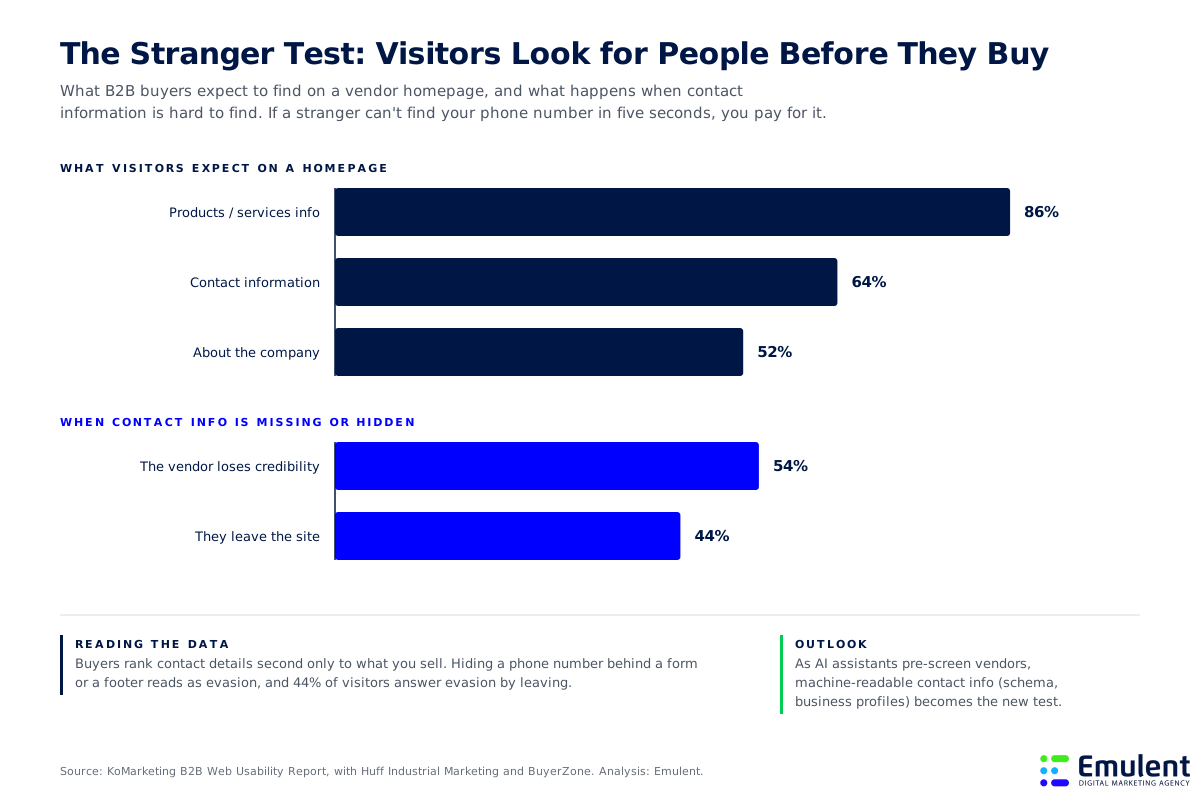
Hiding your phone number behind a form, a chatbot, or three layers of footer reads as evasion, and buyers answer evasion by leaving. For local and service businesses, visible and consistent contact details also feed your search visibility, since name, address, and phone consistency is a foundation of local rankings; our local SEO checklist walks through that work step by step. And the audience for the stranger test is expanding: AI assistants now pre-screen vendors on behalf of buyers, so machine-readable contact details in schema markup and business profiles are becoming part of the same test. We cover that shift in our AI SEO services work.
Passing the stranger test:
- Put a phone number in the header. Sitewide, clickable on mobile. It converts even for visitors who never call, because it signals a reachable human.
- Give the contact page real content. Address, hours, photo of the team or office, and a form that asks only for what you need.
- Mark it up for machines. Organization and LocalBusiness schema make your contact details legible to the AI tools buyers increasingly ask first.
Fix the blink test, the speed wall, the clutter, the navigation, and the stranger test, and your bounce rate will move. The last question is how to read that movement honestly.
How Should You Measure Whether Your Bounce Rate Is Actually Improving?
Bounce rate only tells a useful story in context. Current benchmark data puts the cross-industry median in the mid-40s, but the spread is enormous: ecommerce sites often run between 20% and 45%, while blogs and news content sit at 70% to 90% and are perfectly healthy there. A reader who arrives, gets a complete answer, and leaves satisfied looks identical to a frustrated visitor in a single sitewide number. GA4 sharpens this by defining a bounce as a session under 10 seconds with no second page and no conversion event, which ties the metric back to the same 10-second window where visitor decisions actually happen.
A sitewide bounce rate is a vanity metric. The diagnostic value lives at the page level: a 75% bounce on a blog post is normal, and the same number on a pricing page is a fire. – Emulent Strategy TeamHow to read bounce rate like a diagnostician:
- Benchmark by page type, not sitewide. Compare pricing pages to pricing-page norms and articles to article norms. Mixed averages hide every problem worth finding.
- Segment by device and source. A mobile bounce rate running 15+ points above desktop points to a speed or layout failure, not a content failure.
- Pair bounce with engagement. Scroll depth, time on page, and conversion events tell you whether non-bouncing visitors are actually getting value.
- Fix in the order the data ranks. Speed, then mobile fit, then navigation, then content structure. That is the order visitors themselves report. If the fixes point toward a rebuild, work from a structured plan like our website redesign checklist so you do not trade one set of leaks for another.
How the Emulent Marketing Team Can Help
We help businesses find and fix the specific reasons visitors leave: speed and Core Web Vitals work, navigation and information architecture, page-level conversion audits, and designs that pass both the blink test and the stranger test. Every engagement starts with the data on your site, not a template, so the fixes target your actual leaks. If you would like a senior team to look at why your visitors are leaving, contact the Emulent Team for a free digital marketing consultation and we will help you with your website design and user experience.